With Grand Theft Auto VI finally taking over consoles worldwide, millions of PlayStation 5 players are hitting the exact same wall before even stepping foot in Leonida: storage anxiety and hardware strain.
Between a massive 212 GB+ base installation requirement, day-one mandatory patches, and Rockstar’s most dense open-world streaming engine to date, standard console storage is being pushed to its absolute limit. If you are deleting half your game library just to make room—or worrying about frame drops and thermal throttling during marathon sessions—upgrading your internal M.2 slot is no longer optional.
Here is a breakdown of why GTA 6 demands more from your storage drive, how power efficiency and thermals affect gameplay, and why the MOVE SPEED HB7450 PCIe 4.0 NVMe SSD is built to handle it.

GTA 6 characters and city visuals. Source: TechRadar
1. The GTA 6 Storage Crunch: Why 667GB Isn't Enough Anymore
If you own a launch-edition PS5, you only have about 667 GB of usable internal storage out of the box. GTA 6 alone swallows roughly one-third of your entire console, and that is before future GTA Online expansions and seasonal updates roll out.

Instead of constantly juggling downloads or offloading games to a slow external USB drive (which cannot play native PS5 titles directly), expanding your internal M.2 NVMe slot lets you keep GTA 6 alongside your other AAA favorites—ready to launch instantly.
2. Beyond Capacity: Why Open-World Gameplay Demands 7,450MB/s & Low Power
In older games, SSD speed only mattered during loading screens. In GTA 6, your SSD is actively working every second you play.
High-Speed Asset Streaming
Driving at top speed down Vice Beach, switching between protagonists, or flying through dense cityscapes requires the PS5 to stream massive high-resolution textures, NPC AI routines, and audio files in real time.
- Sony recommends a minimum sequential read speed of 5,500 MB/s for PS5 expansion drives.
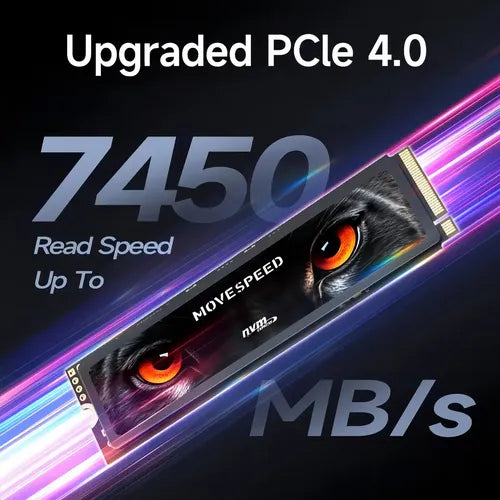
- The MOVE SPEED HB7450 pushes the PCIe Gen4 x4 interface to its ceiling with up to 7,450 MB/s read speeds and 6,500 MB/s write speeds—eliminating texture pop-in, micro-stuttering, and asset loading delays.
Gameplay Power Consumption & Thermal Control
Long, graphics-heavy open-world sessions generate significant heat inside the PS5’s compact expansion bay. When an SSD draws too much power or lacks proper cooling, it triggers thermal throttling—drastically slowing down data transfer speeds mid-game.
This is where controller architecture and cooling design make a real difference:
- Ultra-Low Power Efficiency: Powered by the advanced Maxio MAP1602 controller with an ultra-low-power SoC design and 3rd-Gen Agile ECC error correction, the HB7450 delivers peak PCIe 4.0 bandwidth while drawing minimal power—reducing overall thermal output inside your console or gaming laptop.
- Dual-Layer Cooling (-10°C): Equipped with a 1mm graphene composite thermal pad plus an included metal heatsink, it actively lowers operating temperatures by up to 10°C, ensuring rock-solid stability even after an 8-hour GTA 6 session.
3. Meet Your Ultimate PS5 & PC Upgrade: MOVE SPEED HB7450 NVMe SSD
Engineered specifically for high-intensity gaming on PlayStation 5, Desktop PCs, and Laptops, the MOVE SPEED HB7450 combines flagship speed with plug-and-play convenience:
- Blazing PCIe 4.0 x4 Speed: Up to 7,450 MB/s read and 6,500 MB/s write—2x faster than PCIe 3.0 and over 12x faster than SATA SSDs.
- Flexible Capacities (1TB / 2TB / 4TB): Add 1TB to comfortably house GTA 6 plus 15–20 other titles, or step up to 2TB or 4TB to build a permanent next-gen game vault.
- 3D TLC NAND Flash: Built with carefully selected original 3D TLC NAND chips for superior endurance, faster sustained writes during massive game updates, and long-term reliability.
- All-in-One Installation Kit: Every box includes the M.2 2280 SSD, dedicated heatsink, mounting screws, and a precision screwdriver—no extra tools required.
- 80+ Hours of Extreme Testing & 5-Year Warranty: Tested across 6 rigorous rounds (including 48-hour continuous data transmission and high/low-temperature aging) and backed by a 5-year worry-free warranty.
4. Quick FAQ: Upgrading Your PS5 SSD for GTA 6
Q: Does the MOVE SPEED HB7450 fit inside the PS5 expansion slot with the heatsink attached?
A: Yes. The standard M.2 2280 form factor (80mm × 22mm) and custom low-profile heatsink are designed specifically to fit inside the PS5’s internal expansion bay with the metal cover closed.
Q: Can I move my existing GTA 6 installation to the new SSD without re-downloading 212GB?
A: Yes! Once you install the HB7450 and let the PS5 format it on startup, simply go to Settings > Storage > Console Storage > Games and Apps, select Grand Theft Auto VI, and choose Move to M.2 SSD Storage. Transferring 212GB takes only a couple of minutes.
Q: Will this SSD also work if I upgrade to a gaming PC later?
A: Absolutely. The HB7450 uses the universal M.2 2280 PCIe 4.0 standard, making it 100% compatible with gaming desktops, motherboards, and laptops.
Ready to Explore Leonida Without Limits?
Don't let a "Not Enough Free Space" pop-up or overheating drive ruin your GTA 6 experience. Upgrade your console's storage and speed in under 10 minutes.
👉 Shop the MOVE SPEED HB7450 PCIe 4.0 SSD (1TB / 2TB / 4TB) Now — Includes Free Worldwide Shipping on orders over $99 and a 5-Year Official Warranty.